AI knows almost everything. It doesn't know the inside of your building.
Visitors scan the QR code where they are standing, ask in their own language and read the answer on their own phone within seconds. The answers come from the documents you upload: the store list, the floor plans, the program, the opening hours. No app, no sign-up, no kiosk.
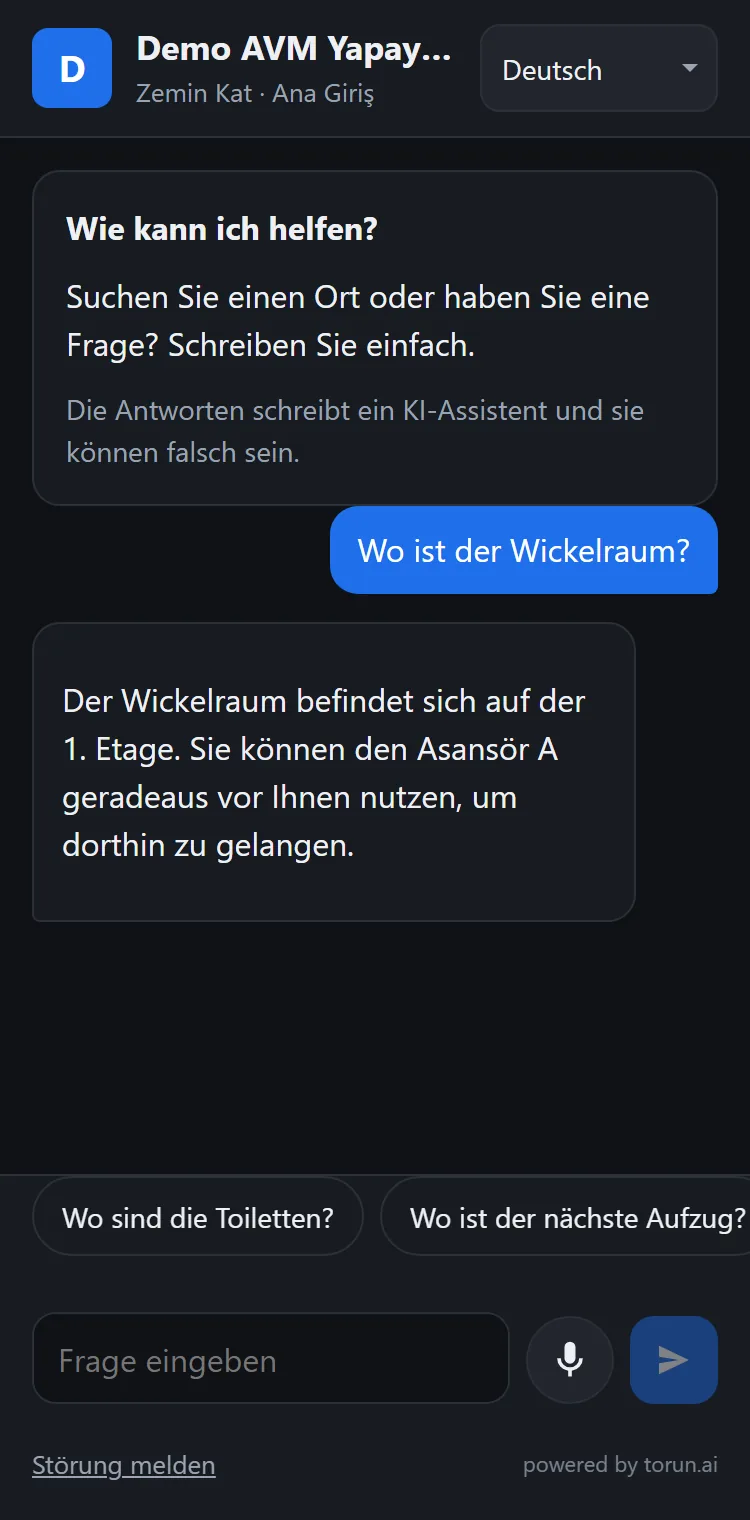
The answer isn't on the internet. It's inside the venue.
Everyone carries an AI that knows the whole internet. Stand in a shopping mall and ask it where the baby changing room is, and it has nothing to go on: which store is on which floor, which restroom is closed today, which room the seminar is in. That knowledge sits at one information desk, in one language, during office hours, and not a single question asked there is ever recorded.
One spot, one language, office hours. When it gets busy there is a line, and people give up asking.
Fixed, and quickly out of date. When a unit moves it has to be reprinted, and it never learns what people were looking for.
Hardware, installation and maintenance. It stands in one place, draws a line and usually speaks one language.
A one-time visitor won't install an app to ask where something is. Every step that needs an install lowers use.
The QR code belongs to the spot, not to the building
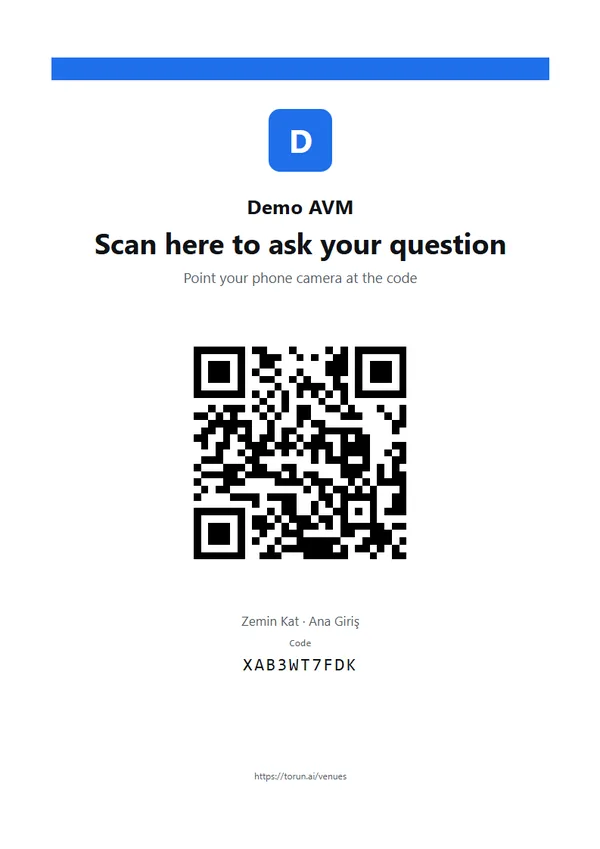
The code at the entrance and the code on the second floor are different codes. The assistant knows where the visitor is standing and gives directions from there, with no sensors, cabling or indoor positioning hardware.
The phone's camera is enough. No app to download, no account, no form. The page opens with the venue's own name and logo.
Type, or hold the microphone and speak, up to 30 seconds per press. The page works in 29 languages.
The answer arrives in writing, so directions can be re-read on the way. Within the same visit, the assistant remembers what was asked before.
Illustrative example: the same question at three spots gets three answers. Directions are worked out from the spots and places your staff mark on the floor plan; the assistant never invents a floor, a direction or a distance.
The answers are for your visitors. The record is for you.
Foot-traffic counters tell you how many people came in, not what they wanted. Every answer the assistant gives leaves a record that nobody keeps today, and all four come from the same source: the question that was asked.
What was asked, at which spot, at what time of day and in which language, with a list of the most-asked questions. Input for campaigns, leasing, layout and staffing.
Every question your documents have no answer for is collected in its own list, for example: “340 people asked for a pharmacy this month, and there isn't one in the building.” Measured demand while you look for a tenant. The list downloads as Excel or CSV.
A visitor writes “the restroom upstairs is closed”. The report reaches the manager's panel straight away, stamped with the spot and the time, and is sent by e-mail too. If nobody picks it up within the set time, it moves up to the next person in charge.
The most-asked questions show which stores and which companies people were looking for. You decide what to share with your tenants or exhibitors: information for them, not about them.
This is not a visitor count. What is measured is the questions asked, not the people through the door.
One setup, many kinds of venue
Nothing is custom software. What changes from venue to venue is the documents you upload and the spots where the codes hang. Each venue runs in its own space, with its own documents and its own address.
Shopping malls
Store locations, campaigns, parking, events, the baby changing room. The leasing team sees measured demand for an empty unit in the asked-but-not-found list.
Request a demoExhibitions and congresses
Exhibitor list, halls and stands, the seminar program, coat check, shuttles. When a stand moves at the last minute, the answer changes as soon as the list is updated.
See the exhibitions pageAirports
Gates, baggage, transfers and service points. Travelers ask in their own language, and the report shows which languages and which hours the questions pile up in.
Request a demoHospitals
Outpatient clinics, registration, the laboratory, visiting hours. The assistant does not diagnose: it gives the information about the building and the service, and points to a professional for personal decisions.
Request a demoCampuses
Buildings, lecture halls, the library, student affairs, the cafeteria, shuttle times. A code at every building entrance for the student who is here for the first time.
Request a demoMunicipal and public buildings
Procedures, lines, required documents, where each office is and when it is open. The head office writes it once, and every service building answers with the same information at its own spots.
Request a demoBranch networks
Head office uploads a document once, and every branch answers from it with its own codes. A branch manager sees only their own branch's reports.
Request a demoThree principles
No tenant or exhibitor can pay to be put first; the order of an answer cannot be bought.
The assistant is set up to answer only from the documents the venue uploads. When there is no answer, it says so, and the question goes to the asked-but-not-found list.
No account, no form, no name or phone number. The visitor scans the code and asks.
We collect questions, not people
The record is made of the question: what was asked, at which spot, when, in which language, and whether an answer was found. The venue sees what its visitors are looking for without knowing who they are.
Documents, spots and posters, not hardware
You upload the store, unit or exhibitor list, floor details, opening hours and services, as Word, PDF, Excel or PowerPoint; no special format. You pick the spots, and a print-ready poster comes out of the system for each one. The page goes live with the venue's name, logo and color, and the people you choose get panel access.
Visitors scan, ask and read. When a document changes, the answers follow; you don't wait for us to update anything. Fault reports reach the panel and e-mail straight away, and the question allowance is visible in the panel at any time.
The demand report is in the panel, and the asked-but-not-found list downloads as Excel or CSV. The spots and codes stay where they are; what changes is the content you upload.
Frequently asked
Does it need internet?
Yes: the visitor's mobile connection or the venue's Wi-Fi is enough. The page is light and opens quickly on a weak connection.
We run more than one venue.
Each venue is set up with its own content, codes and reports, all managed from one account. Head office writes once and the venues below it answer from the same information; each manager sees only their own venue.
Can we get a surprise bill?
No. The number of questions is set in the contract and usage is visible in the panel at any time; when the number runs out, no extra charge is made without your approval.
We already have an app.
The same page can be opened from your app. The QR code is the route for the visitor who won't install anything; the two work together.
Where do the codes go?
On existing signs, directory boards and shop windows. No new structure or screen is needed, and spots can be added later.
Is the AI trained on our data?
No. The AI is not trained on your data; the documents are read at the moment a question is asked. That is why an update to a document shows up in the answers.
We're looking for the first venue to set it up with
The software is ready and live. We start with a short setup on a limited number of spots: we handle the setup and configuration, the venue provides the documents, and at the end we read the report of what visitors were looking for together. Scope, duration and terms are agreed in a meeting.
Before we meet: we can build a trial page from the public store or exhibitor list on your website, so you can try the assistant on your own phone with your own venue's information.